
How to choose a CRM that fits your business
Do you need a CRM at all, which usage scenario is yours, which features actually matter and what the hidden cost is made of — open-source solutions included. Plus our selection approach and two cases from practice.

This article is for anyone choosing a CRM for their business right now. It will be most useful to small and medium-sized companies.
Do you need a CRM?
If you work alone, you will most likely notice for yourself when you need a CRM — your current tools will simply become inconvenient. And yes, we want to talk you out of a CRM a little. Why? Because a CRM is not just convenience — it also costs you time, and time is your main resource when you work alone.
When you work alone or as a team of two, a shared task tracker and cloud document storage can easily replace a CRM. But over time the business grows, and a third, fourth, fifth person joins the team. Now you want to see the change history, assign access levels, attach files to tasks and so on. At this point the familiar tools start creating more limitations than convenience. That is when it makes sense to ask: which CRM should we choose?
There is another, simpler scenario: the need to store customers' personal data. Working with personal data requires appropriate organisational and technical safeguards. At some point an ordinary shared Google Sheet may no longer be enough (this is not legal advice: the specific requirements depend on your processing purposes). We covered the obligations that come with handling personal data in more detail in a separate article.
Why exactly at this point? It's simple: before introducing a CRM, you need to understand why you need it. You should already have at least a basic picture of your own processes: what data you want to store, which entities and fields you need and how they relate to each other. Trying to anticipate everything up front and build the perfect CRM right away usually leads to one of two outcomes:
a) the system becomes too complex and hard to find your way around. As a result, the learning curve for users gets steeper;
b) the system is constantly being rebuilt: processes change, and the CRM structure has to change with them.
So we give our clients a simple rule: if pen and paper are enough, use pen and paper. When you run out of paper and your current tools start getting in the way of work, that's the right moment to think about a CRM.
Typical usage scenarios
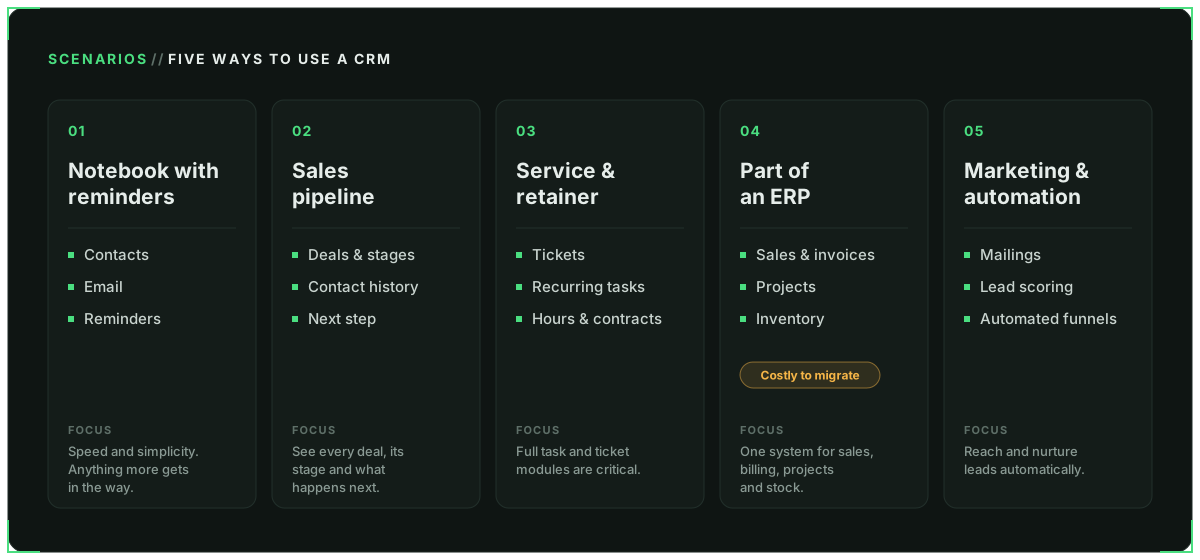
- CRM as a notebook with reminders. What matters is speed and simplicity: contacts, email and reminders. Anything more will mostly get in the way at this stage.
- CRM as a sales pipeline. What matters is seeing deals, their stages, the contact history and the next step.
- CRM as a service and retainer system. What matters is tickets, recurring tasks, tracking hours and contracts. Full-fledged task and ticket modules are critical here.
- CRM as part of an ERP. What matters is bringing sales, invoices, projects and inventory together in one system. The cost of a wrong choice is much higher here: moving off an ERP is usually harder than moving from one CRM to another.
- CRM as a marketing and automation tool. What matters is mailings, lead scoring and automated funnels.
BPM as a business process management system is outside the scope of this article.
Features that actually matter — not the ones they're trying to sell you
- Import and export of all data in an open format. This is your insurance against lock-in and one of the features you will genuinely need when migrating — both to a new platform and away from it.
- API and webhooks instead of a thousand ready-made integrations. With good documentation and the necessary access to the CRM, you can connect almost any external service, rather than being limited to the apps officially approved and listed in the integrations catalogue.
- Access rights and audit log. Fairly basic features, but not every CRM offers them by default. Some vendors charge extra for them or include them only in more expensive plans.
- Custom fields, objects and formulas right in the interface. When you need to add a new field, change the structure or set up a formula, it helps if you can do it yourself in a built-in editor instead of calling in a specialist for every change.
- Email integration: IMAP/SMTP or only OAuth with Google/Microsoft. Not every CRM lets you connect any email provider out of the box. In our experience, if your mail is hosted with a European provider, this can become a problem and require an additional workaround.
- Localisation. It seems like a basic feature, but it's still worth checking. An English interface may not be a problem, but currency, date and address formats — as well as the ability to export data for DATEV (the standard accounting software in Germany) — may turn out to be critical.
The hidden cost
The things that are easy to miss on the pricing page. Some points overlap with the previous section, but it's worth listing them again — this time from the perspective of what a CRM really costs.
- API calls and webhooks. In Odoo CRM, the Standard plan does not include access to the External API — it is only available from the Custom plan up. Odoo's built-in integrations still work, but you can't connect your own or third-party integrations via the API on this plan.
- Limits on contacts and deals. Monday CRM's entry-level plan caps you at just 1,000 active contacts and deals.
- App integrations. In EspoCRM, some direct integrations, Zoom for example, are available as separate paid extensions.
- Access rights. In Twenty CRM, record-level permissions are only available on the Organization plan.
- AI features. These days it's easier to list the CRMs without AI, but access to such features may be billed separately. Factor that into your budget too.
- Price per user. Most CRMs charge per seat, so keep your team size in mind. That said, there are also solutions with no limit on the number of users.
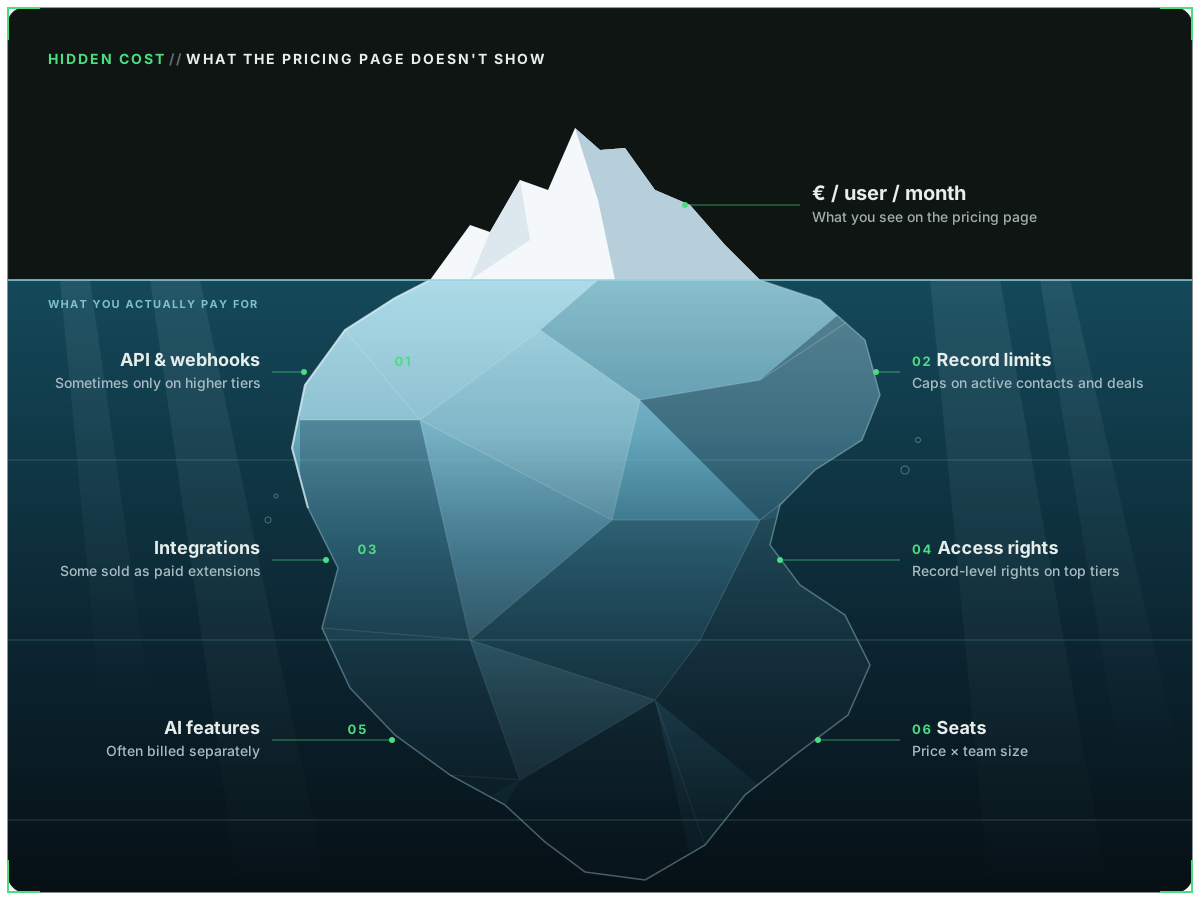
Information as of September 2026. CRM plans, prices and limits are subject to change.
"Free-ish" CRMs
This is about open-source solutions. We have a lot of experience with them — enough that the topic deserves an article of its own. But in short: a free licence doesn't mean a free CRM — running such a system costs money too.
What makes up the total cost?
- Hosting. Most likely one of the smallest cost items. For many small servers, €10–40 per month is enough.
- Basic IT support. Open-source solutions need regular updates and monitoring of backups and overall system health. This can take anywhere from a few hours to dozens of hours of work, depending on the infrastructure and the scope.
- Add-ons and integrations. These costs are often not visible on the product's homepage and appear only once you're using the system and need additional features.
Examples:
- In the SuiteCRM extension store, the Price Books module costs $200 a year (Price Books | SuiteCRM Store).
- EspoCRM offers Workflows as a paid extension for about €400 a year (Advanced Pack).
- Twenty CRM, even in the self-hosted version, charges separately for some features: $25 per user per month for SSO, row-level security and audit logs (Twenty — Pricing).
Objectively speaking, self-hosting is not about saving money. It's about extended logic, the ability to fully adapt the system to your needs, and control over where your data is stored and who it's shared with.
How to test and choose what fits you
One option is to run a two-week CRM pilot on real data: set up a few working scenarios, measure the number of clicks and the time it takes to prepare reports, and check the data export.
A great idea, but in practice it falls apart on effort. How long will it take to set up the processes you need in a completely unfamiliar interface? On top of that, add a few weeks for the actual work, the measurements and the analysis of the results.
Such a pilot will most likely take far more time than you'd like. And chances are you'll end up staying with exactly the CRM you tested. First, you'll have got used to it and its interface. Second, you're unlikely to want to repeat the whole process with another system.
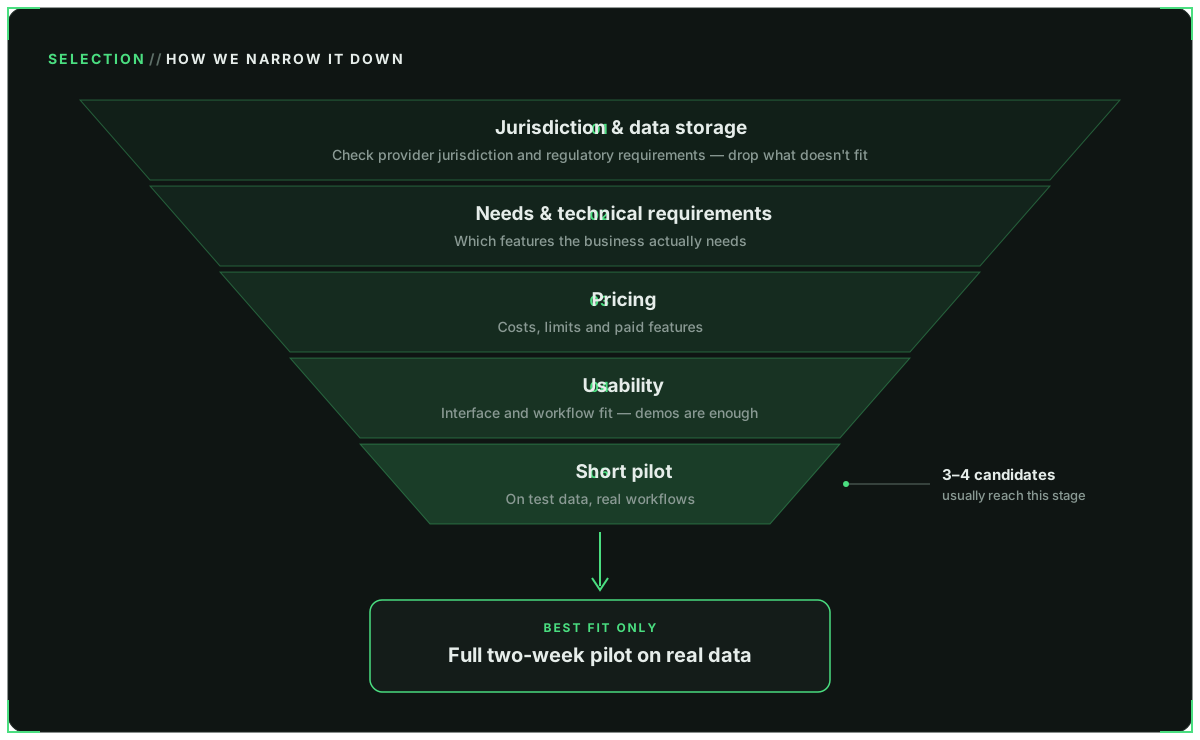
We offer our clients a different approach:
- Jurisdiction and data storage. We check the provider's jurisdiction and regulatory requirements and filter out unsuitable solutions right away.
- Needs and technical requirements. We determine which features the business actually needs.
- Pricing. We compare costs, limits and paid features.
- Usability. We assess the interface, how well it fits your workflows and personal preferences. Demo versions are enough at this stage.
- A short pilot on test data.
Usually 3–4 solutions make it to the last stage. Those are the ones we test and compare in real working scenarios. Only after that does it make sense to run a full two-week pilot on real data with the best-fitting option.
Our experience and our clients' experience
Everything above is based not only on theory but also on our own experience. We believe it's practically impossible to find a perfect SaaS CRM that fully meets your specific needs. It's a mass-market product built for a broad range of users, so you will inevitably have to live with shortcomings and make compromises. And what is a drawback for one business may be an advantage for another.
With a self-hosted CRM under an open-source licence (AGPLv3, for example), you get a more flexible tool that can be tailored as precisely as possible to you and your needs. But the more custom logic you add and the further you move away from standard scenarios, the higher the risk of errors and the more resources maintenance and support will require.
There is also a separate segment: building a CRM for a specific company. We won't cover it in this article — such solutions can cost hundreds of thousands of euros.
An example of how to save on a CRM
A small company came to us with a rather unusual request. The budget was limited and the daily load on the system minimal, yet around 100 active users work in the CRM every month.
They needed roles and areas of responsibility, logs and change history, and ticket handling. Their previous solution would have cost about €4,100 a month at €41 per user. And even for that money, the system couldn't implement the custom logic they needed.
We found the best-fitting solution for this company: moving to a self-hosted CRM on a server for about €26 a month, with up to 5 hours of support per month, including small improvements. On top of that, one-off costs for data migration and the initial system setup.
An unusual use of a CRM
The record is not a person but an object.
Take a company that hosts hardware. It had no conventional sales pipeline, so we made the hardware, not the customers, the central object of the CRM.
Each unit is identified by its serial number. The record tracks electricity costs, the date of the last maintenance and the current status: logistics, repair or maintenance. Several contracts can be linked to one unit, and the customer is just one of the related fields.
An example of using a CRM's existing fields without moving or migrating data:
| Built-in CRM field | How we use it |
|---|---|
| Contact | Hardware unit (identified by serial number) |
| Customer | Related field (one customer can have several units) |
| Pipeline stages | Lifecycle statuses (logistics, maintenance, repair — with cyclical transitions) |
| Deal | Maintenance or repair (recurring events while the unit is in the rack) |
| Close deal | Not used. Instead, a "Next maintenance due" field |
| Deal value | Electricity costs and contracts per unit |
| "What's in the pipeline" report | "What's overdue" and "What's in repair" reports |
Need help?
If you need advice on choosing a CRM, or help with migration, configuration or rolling out a self-hosted solution — which is what we specialise in — get in touch. We'll be glad to help.
To make a well-informed decision, we also recommend reading our previous article. There we mainly look at legal and regulatory questions, while here we focused on internal business processes. In the final part of the series we'll take a detailed look at self-hosted CRMs. In the meantime, follow us on social media so you don't miss it.